
First you plug it in first or Flasdisk External HDD that you want to fill with PS2 games to a computer, at this time I use the External HDD.
Caption 2 by arrows;
- Open USBUtil 2.1 application and then you click Salir as shown below;
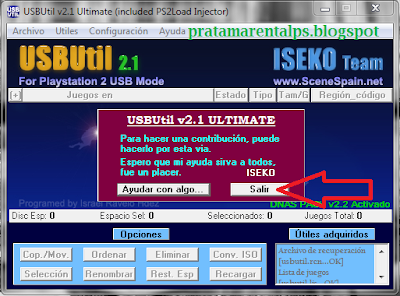 |
| Figure 1 |
- Archivo Selanjutnyakita select the tab as shown below;
 |
| Figure 2 |
- To view, edit or copy from another drive already installed PS2 games.
- To install a PS2 game where The files are in the form of ISO.
- To meninstal PS2 games directly from the CD / DVD PS2 games.
- The next page will appear as below, click Cerrar;
 |
| Figure 3 |
- then you will appear as shown below;
 |
| Figure 4 |
Caption 4 by arrows;
- The location of the CD / DVD you (usually already detected Automatic).
- Type of tape you want to install, you should select AUTO.
- You want to install the game in the form of ISO (to be stored in another drive as a back up) or Direct PS2 format.
- You select the drive where the game will be installed.
- Give the title game in the existing columns.
- After all that is done click Crear and prosespun runs as shown below;
 |
| Figure 5 |
 |
| Figure 6 |
- And when you're done click Cerar, and finally finished already installed from the CD / DVD for the PS2 and copy from HDD / Flasdisk others do almost the same, see Figure 2 and then select the drive where we have installed gamma PS2nya, see picture below;
 | ||||
| Figure 7 |
Caption 7 corresponding arrows;
- Drive where we have menginatl PS2nya game.
- Choose ul.cfg to display data installed.
- Choose Cargar to the next step and will appear as shown below;
 |
| Figure 8 |
- Select the game that we would like a copy of arrows we select No. 1 after we click the Cop / move like an arrow No. 2, then it will appear as shown below;
 |
| Figure 9 |
- Specify the drive where you would like the copied arrows No. 1, then click the arrows Copiar as no 2 and prosespun runs, and finally finished, just unplug HDD / Flasdisk you plug the PS2 to play ..., may be useful.


